
How to set up your space for online music lessons
A well-placed camera beats an expensive one. We show you how to set up lighting, noise, music stand and camera for the instrument you play.
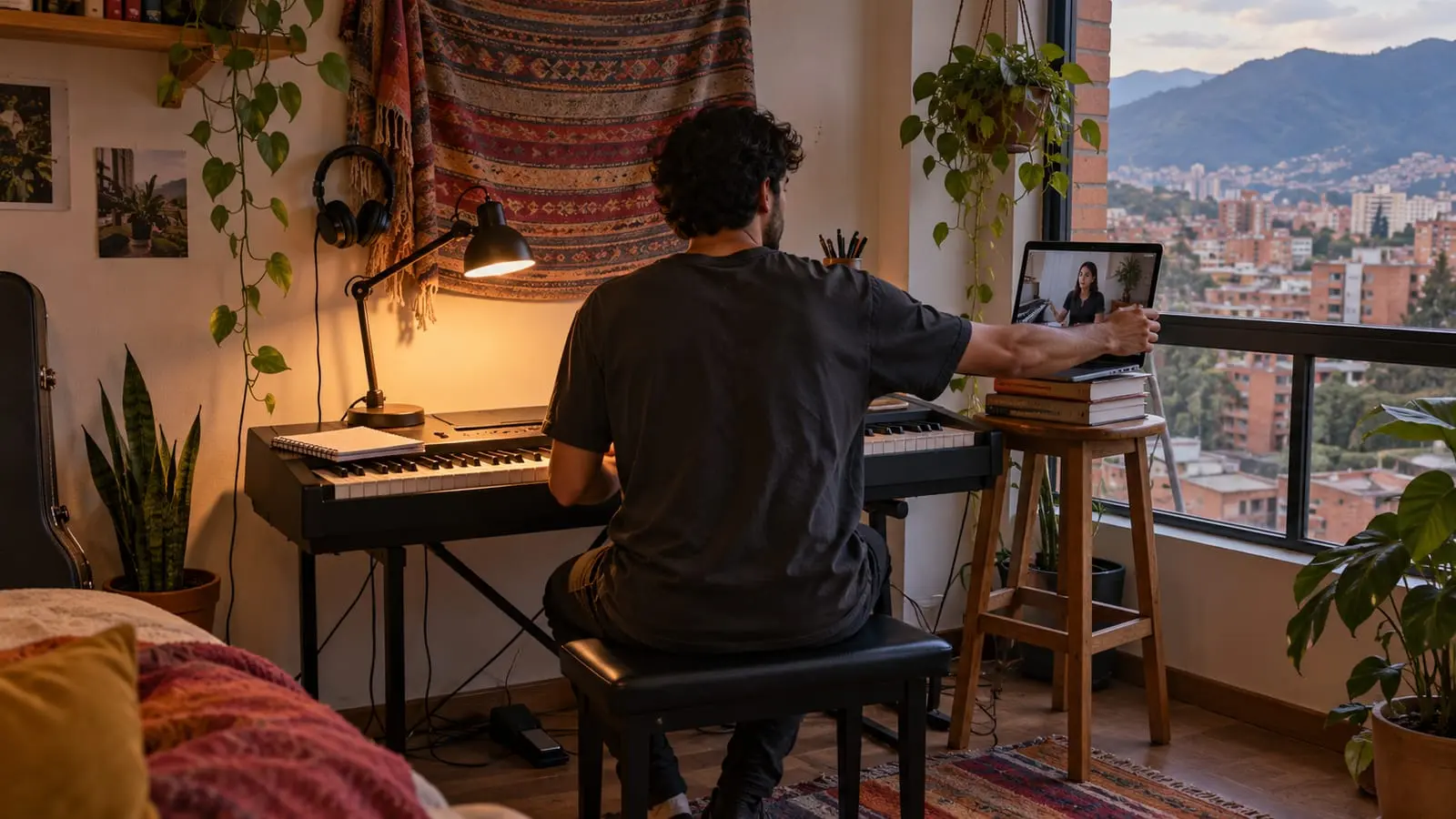
A good space for online music lessons has three things: light from the front or side, little noise or echo, and a camera positioned so your teacher can see what needs correcting. That last point varies most between instruments: for piano, both hands and the pedal matter; for violin, the path of the bow; for singing, your jaw, shoulders, and breathing.
This guide takes you through it step by step. If you haven't chosen a lesson format yet, start with in-home or online lessons.
In short
- Light should come from the front or side; a window behind you leaves your hands in shadow.
- A room with a bed, curtains, and furniture sounds better on a call than an empty room with a tile floor.
- Position the camera according to what your teacher needs to see of your instrument, usually in landscape orientation and at hand level.
- Put the screen near the music stand so you can see your teacher without turning your head or losing sight of the sheet music.
- Do a full test the day before: play for two minutes with the same camera, lighting, and audio setup you'll use for the lesson.
Choose your space: quiet, echo, and room to move
Before thinking about the camera, think about the room. Find the quietest spot in your home, away from the kitchen, washing machine, and street-facing window. In Bogotá, buses, motorcycles, and alarms are easily heard indoors, and your microphone picks up more of that noise than you think.
Next, listen for echo. Large rooms with tile or wood floors and bare walls reflect sound, making your instrument sound distant and unclear on the call. A room with a bed, curtains, a rug, or a bookcase absorbs those reflections. If the living room is your only option, a rug beneath you and closed curtains already help.
Finally, check how much space your instrument needs:
- Violin and viola: clear space to your right so you can use the full length of the bow without hitting a wall or desk.
- Cello and double bass: a floor where the endpin won't slip (a nonslip endpin stop helps) and an armless chair at the right height.
- Trombone: clear space in front of you to extend the slide fully.
- Guitar and bass: an armless chair and, for classical guitar, a footstool or guitar support.
- Drums: keep the camera and microphone away from the cymbals; we explain where below.
If possible, sit near the router or somewhere an Ethernet cable can reach.
Lighting: help your teacher see your hands
- Your main light source should be in front of you or to one side, never behind you. A window at your back turns you into a silhouette.
- If your only light is a ceiling bulb, add a lamp aimed at the instrument: on piano and guitar, avoid shadows over your fingers.
- In Bogotá, it gets dark around six in the evening for most of the year, and cloudy days are common. If your lesson is late in the afternoon, test the lighting at that time, rather than at noon.
- Turn off the TV or any lit screen behind you: the camera adjusts its exposure to that brightness, leaving you dark.
- Light your sheet music too. Reading in shadow makes you lean forward and changes your posture just when your teacher is checking it.
Where to put the camera for your instrument
The general rule: phone or camera in landscape orientation, secured on a tripod or stand, at the height of what needs to be seen. Never have someone hold it or prop it against a glass. Then adjust for your instrument:
| Instrument | Where to place the camera | What should be visible |
|---|---|---|
| Piano or keyboard | To one side of the keyboard, slightly raised and angled toward the keys. | Both hands in full, wrists, back, and, when working on pedaling, the right foot. |
| Guitar and bass | In front of you at chest height, angled slightly toward the neck. | Both hands, the entire neck through to the headstock, and how you support the instrument. |
| Violin and viola | In front of you and slightly to your right, at instrument height. | The bow's path (whether it stays parallel to the bridge), your left hand, and your shoulder. |
| Cello | In front of you at an angle, a few steps away, and lower than for violin. | The entire instrument, from scroll to endpin, both hands, and your seated posture. |
| Singing | In front of you at eye level, far enough away to show you from head to waist. | Jaw, neck, shoulders, and rib movement as you breathe. |
| Wind instruments | In front of you or at a slight angle, at face height. | A close view of your embouchure, both hands, and posture. For flute, the entire tube should fit in the frame. |
| Drums | Raised and angled from the front, to one side of the kit. | Both hands, the bass drum foot, and the seat height. |
One camera angle isn't always enough. In piano, for example, your teacher may ask you to bring the camera closer to your right hand to see the fingering in a passage, or lower it to check the pedal. Keep the stand easy to move and practice that adjustment before the lesson.
Music stand and screen: seeing your sheet music and teacher
Almost no one anticipates this problem: if the camera is beside you to show your hands, the screen is also to the side, and you end up turning your head to see your teacher. That changes your posture just when they're observing it.
- Set the music stand at eye level, rather than laying the music flat on a table, so you don't play with your neck bent.
- Put the screen beside the music stand or just above it, so you can shift your eyes from the sheet music to your teacher.
- If you use your phone as a side camera, consider a second device in front of you to see and hear your teacher. Turn off the microphone and speaker on the camera-only device to avoid echo.
- Print or download the sheet music before the lesson. Reading it on the same screen as the video call shrinks your teacher to a tiny box.
- For piano, put the sheet music on the instrument's music stand; the screen can sit on top of an upright piano or on a support beside the music stand.
Remember that online lessons work in turns: your teacher explains, then you play. You don't need to see them while playing, but you do as soon as you finish, so you can receive feedback without changing your position.
Noise and agreements at home
- Tell your household when your lesson is: no blender, vacuum cleaner, or loud phone calls nearby.
- Close windows and doors; if you have a dog, keep it out of the room.
- Put your phone on do-not-disturb mode. On some phones, an incoming call interrupts the video call.
- Ask others to avoid heavy internet use during the lesson: downloads, online gaming, or high-quality videos.
- If you live in an apartment, be mindful of lesson and practice times; sound from acoustic instruments travels easily through walls and floors.
For children, an adult should also stay nearby, especially during the first few lessons. Here we explain how to support your child in online lessons.
Checklist before connecting
- Instrument tuned. If you play strings, use the online tuner before joining.
- Camera secured on its stand in landscape orientation, with the framing checked.
- Light on and any window behind you covered.
- Music stand, sheet music, pencil, and notebook within reach.
- Device charging or fully charged, with notifications silenced.
- Water nearby, especially if you sing or play a wind instrument.
- Connection tested and video-call audio set without noise filters.
We explain audio settings, microphones, and headphones in detail in what equipment you need for online lessons. You'll also find full details of online music lessons with our teachers.
Frequently asked questions
How much space do I need for an online music lesson?
Less than you think: enough to play comfortably, plus room for the camera stand one or two meters away from you. What matters is that your bow, slide, or arms don't hit furniture or walls.
What if my home has a lot of echo?
Choose the room with the most furniture and fabrics, close the curtains, and put a rug under your chair. Moving the microphone a little closer to the instrument also reduces the amount of echo it picks up.
Do I need a special background behind me?
No. A background that isn't distracting, with no window or strong light behind you, is enough. A plain wall or a bookcase works well.
Where should I put the camera if my piano is against a wall?
To one side of the keyboard, angled and slightly raised, pointing toward your hands. A tripod with an extendable arm helps you gain height without the stand getting in the way of the bench.
Sources
We checked the facts in this article against these sources on October 22, 2026.